Ship-to check for a parcel leaving the MyCNBox warehouse
Five single-choice answers in, a band of rule entries out. Each entry quotes the MyCNBox help article behind it and links to the page here that explains it.
- Inputs
- Five single-choice answers, nothing typed
- Output
- Five to seven rule entries: clears, blocked or watch
- Sources
- Help articles 10, 21, 43, 46, 51, 67, 71, 73, 74, 75, 160, 165
- Leaves out
- Prices, postcodes, route lists, transit times
Your five answers
Answering lines one to five
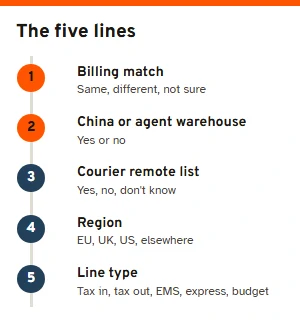
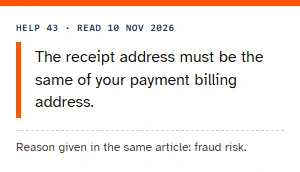
Here is how to use the tool, line by line. Line 1 is the one people get wrong. MyCNBox wants the delivery address to be the billing address held by the bank or wallet that pays (help article 43). If a parent's card pays for a student flat, or a work card pays for a home delivery, the answer is no. If you have moved and never told the bank, the answer is probably no as well.
Line 2 catches the two destinations MyCNBox refuses: anywhere in mainland China, and another agent's warehouse. Line 3 is about the courier, not the post office: DHL, UPS, FedEx and TNT each keep a remote-area list on their own sites. Lines 4 and 5 decide whether the EU notice of 22 October 2026 and the budget EU line come into it.
Press Check. Every answer is required; leave one out and that line turns red with a note, and no result appears. Change any answer afterwards and the band redraws. Clear answers empties the form and the result together.
Where each entry of the band comes from
Five entries always appear. The EU entry joins when line 4 says EU, and the coverage entry joins when you pick the budget line, so the band runs from five to seven. An entry only goes red when a help article rules the combination out; when the article says something may happen, the entry stays amber.
| Cell | Help | Blocked when | Watch when |
|---|---|---|---|
| Who can receive the parcel | 43, 21, 67 | Different billing address; mainland China or agent warehouse | Not sure about the billing address |
| Changing the address later | 10 | Never | Always: there is no edit after dispatch |
| Remote-area surcharge | 51 | Never | Express or tax-excluded line and a remote or unknown town |
| EU parcels since 22 October 2026 | 165 | EU plus a line without tax included, or EMS | EU plus tax-included, express or budget line |
| Budget line coverage | 160 | Never | Budget line outside the EU, or a remote or unknown town |
| Duties when the parcel lands | 46, 74 | Never | Any line not sold as tax-included |
| At your end of the journey | 73, 71, 75 | Never | Always: three jobs that fall to the recipient |
Two entries are amber for everyone. The address lock is absolute, so there is nothing to clear, only something to remember. The last entry collects the three things that fall to the recipient once the parcel is in their country: calling the local courier about a bad address (help article 73), paying again if a parcel comes back after arrival (help article 71), and getting the courier's proof of loss when a Delivered scan has no parcel behind it (help article 75).
Three answers worked through
A flat in Lyon, a line marked tax excluded. Billing matches, not remote, EU, tax excluded. The EU entry goes red: since 22 October 2026 MyCNBox has paused EU options without import tax included, naming the relevant EMS and UPS services. Switching line 5 to a tax-included line turns that entry amber, with the fixed EUR 2 per parcel noted.
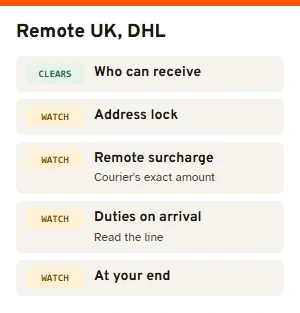
A farmhouse outside Inverness, DHL. Billing matches, remote yes, United Kingdom, express courier. Nothing is blocked, but the remote entry is amber: DHL bills its remote-area surcharge and MyCNBox passes on the courier's exact amount. EMS or a tax-included line would clear that entry, according to help article 51.
A student in Ohio paying with a parent's card. Billing different, everything else ordinary. The first entry goes red. Paying with the student's own card, registered to the same address, is the fix.
Things the band never shows
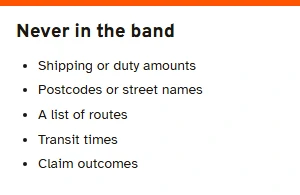
No money. The EUR 2 figure appears only because the EU notice prints it; the check never adds up shipping, duty or surcharges, because the final shipping cost is set after packing by the parcel's real weight and size (help article 48), and the courier sets its own surcharges.
No postcode or street. Remote lists belong to the couriers and change; we would rather send you to the list than guess from a postcode. No route list or transit times either: the lines on offer depend on the parcel, and the warehouse shows them when you submit it.
If an answer you need is not on the form, the help page lists the ways to reach MyCNBox support.