The five days after an item lands: reading MyCNBox QC
The photos are your one look at the goods while a return is still possible. Once you submit the parcel, that door shuts.
- Standard set
- 4 photos, plus weight and a short video
- Multi-buys
- One unit photographed by default
- Extra photos
- Only if bought at checkout
- Help articles
- 17, 31, 32, 35, 36, 40, 61, 88, 92, 97, 125, 157, 158
Four photos, a weighing, and the video question
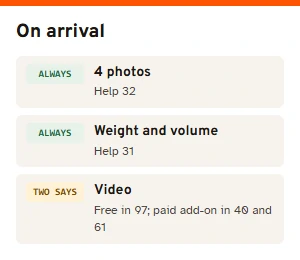
QC photos are the warehouse's pictures of your item after it arrives. Help article 32 sets the standard at four photos; article 31 adds that the QC process covers photos, weighing and video, done within one business day of arrival.
On video, the help centre speaks with two voices. Article 97 promotes “detailed QC videos” of about 15 seconds with a 360-degree view, and the homepage footer links to “Free QC Video”. Articles 40 and 61, on the other hand, list video recording and video QC among the paid add-ons. Both were live when we read them on 10 November 2026. If a video matters to you, check what your order screen offers before paying.
One unit checked when you buy several
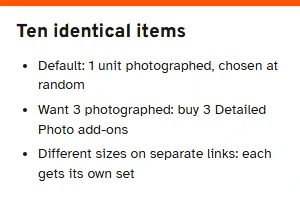
Buy three identical shirts from one link and the warehouse photographs one of them, picked at random (help article 157). The system treats each unit as a separate product, and the article explains the spot check by time and cost: photographing every unit would slow the warehouse down.
If you want more units photographed, help article 158 spells out the arithmetic: each extra unit needs its own Detailed Photo add-on. Ten identical items with photos of three means buying three. For a multi-buy of sizes or colours, one link per variant gets each one its own standard set.
Detailed Photography is decided at checkout
Extra pictures exist, but only on one condition. Help article 32 says Detailed Photography has to be selected when you submit the purchase, with your requests in the notes, and that value-added services cannot be added after the package reaches the warehouse. Article 88 explains why: once the QC photos are taken the item is stored and is not taken down again for more pictures. The official checkout screen carries the same warning above the Submit Order button:
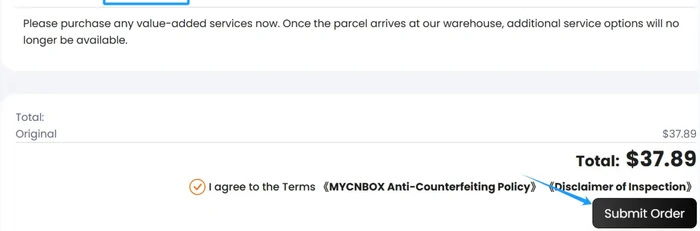
So the decision about extra photos is made before you have seen anything. For a plain tee the standard four are usually enough. For a bag with hardware, a watch, or anything where a detail decides whether you keep it, buy the extra photos at checkout and say in the note exactly what you want shown.
A fixed order for going through the photos
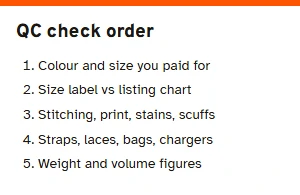
Here is how to check QC photos without skipping anything. Line them up beside the seller's page, then work through the item in the same order every time. Start with the option you paid for: colour and size, then any printed size label against the listing's chart. Then the outside: stitching lines, print or embroidery placement, stains, loose threads, scuffs. Then the parts: straps, laces, dust bags, chargers, anything the listing shows in the box.
Look at the weight and volume figures too. The warehouse list shows them per item, and they are what international shipping is worked out from, so a pair of boots that came in heavier than you expected is worth knowing about now.
If the fault is the seller's, a mix-up of item or something arriving broken, a return is free: MyCNBox gets the seller to cover the postage back (help article 92). If it is a matter of taste, the return fees below apply.
Returns close once you submit packing
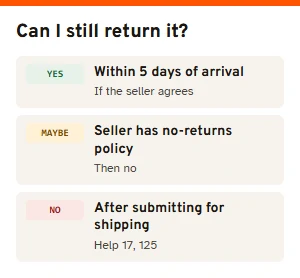
A return has to be requested within five days of the goods entering the warehouse, and the seller has to agree (help article 35). The refund reaches your balance in about seven to fifteen days, depending on the seller; some sellers run a no-returns policy, and then there is nothing to request.
After you submit items for shipping, returns are not supported at all (help article 17). Consolidated parcels cannot be split back to different sellers. That is why this page sits between the warehouse and the address: read the photos, decide, and only then submit the parcel. Fees for a change-of-mind return are written four ways in the help centre; the sellers and sizes page lists all four.