Paying for a MyCNBox order when the card has to match the address
The payment is where the billing address first gets compared with anything. This page covers what MyCNBox accepts, what the bank checks, what the rate on screen includes and how money comes back.
- Accepts
- Three official lists that do not agree
- Checks
- 3DS on cards; KYC from the receiving bank
- Help articles
- 19, 20, 59, 60, 61, 63, 64, 65, 66, 67, 68, 99, 102, 125, 130
- Currency
- Prices shown in yuan; 16 display currencies
Three payment lists from three official places
MyCNBox does not publish one list of payment methods. It publishes three, and they differ. We print them separately rather than merge them, because merging would claim something none of the three pages says.
| Source | Methods named |
|---|---|
| Article 63 | VISA, MasterCard, Apple Pay, Google Pay, Klarna, iDeal and certain local wallets |
| Article 102 | VISA, MasterCard, Apple Pay, Paypal, Skrill, and certain local wallets |
| Homepage footer logos | VISA, Mastercard, Apple Pay, PayPal, Skrill, BLIK |

Both help articles add that most major currencies are accepted and that card payments go through 3D Secure. Whichever method you use, the billing address on file with it is the one that has to match the parcel label.
3DS checks and the billing details the bank compares
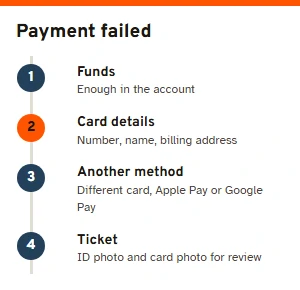
3DS is the bank's step, usually a code by text message or a prompt in your banking app. Help article 67 is plain that the payment cannot go through until you complete it. When a payment fails, the same article gives a short order of checks: enough funds in the account; the card number, the name and the billing address typed exactly as the bank has them; then another card, or a wallet such as Apple Pay or Google Pay.
If you think 3DS declined you by mistake, MyCNBox asks you to open a ticket and attach pictures of your ID and of the card for a manual review. A payment that went through on your side but still shows as unpaid usually updates within a minute; if not, contact customer service straight away with the order number copied (help article 68).
KYC, as the receiving banks require it
Please understand that KYC is a mandatory requirement from Chinese receiving banks … without completing it, your foreign currency payment cannot be legally converted into RMB and credited to the MYCNBOX account.
MyCNBox help article 130, read 10 November 2026
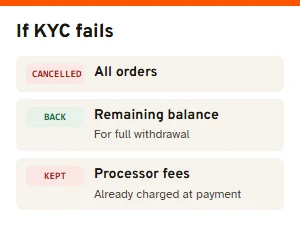
KYC (know your customer) is an identity check, and article 130 puts the requirement on the Chinese banks that receive the money, not on MyCNBox. If verification fails or you decline it, all your orders are cancelled and the remaining balance goes back to your account for full withdrawal. What does not come back is any transaction fee the payment processor already charged when you paid.
This is a second reason to keep names consistent. The name on the card, on the account and on the parcel label should all be the same person.
Pounds, euros or dollars into yuan
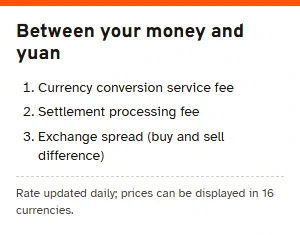
Sellers are paid in yuan, so a payment in pounds, euros or dollars is converted somewhere. Help article 59 says the rate shown on mycnbox.com is updated daily and tracks Google's rate closely, but may not match it, because third-party providers charge currency conversion fees, settlement fees and a spread. And it states plainly: “We do not manually inflate exchange rates.”
The site can display prices in 16 currencies, from pounds and euros to rand and riyals, but sellers are paid the yuan amount, whatever your screen shows. A third-party fee table updated on 2 October 2026 put MyCNBox's rate at about 10.3% above the reference rate; we have not measured it ourselves, so treat that as one outside reading with a date on it.
The rate matters again on refunds. Help article 20 says a refund is worked out from the yuan actually left after the original conversion, so what comes back in your own currency may not equal what left your account.
Every line that can appear on the bill
MyCNBox's own formula is “original product price + international shipping” (help article 99). There is no purchasing service fee and no warehouse receiving or QC fee; article 60 gives the example of a ¥100 item for which MyCNBox receives exactly ¥100. Read the official screens, though, and a few more lines appear:
- At checkout: what the listing costs, plus the seller's charge for posting it to the warehouse if there is one. One link is one order with its own domestic fee.
- Optional add-ons: Detailed Photography, video recording, shoe-box removal, extra protection, vacuum sealing, outer box reinforcement, wooden crates (help article 40). Prices appear on the operation page only.
- At packing: international shipping, paid as an estimate. After packing, the real weight and size set the final cost: overpayment goes back to the balance, underpayment waits under Pending Additional Payment (help article 48).
- Insurance: optional; the help centre puts it at 3% to 8% of item value, varying by channel (help article 50).
- Banks and processors: conversion and handling fees kept by the bank or payment channel; MyCNBox says it receives none of them (help article 60).
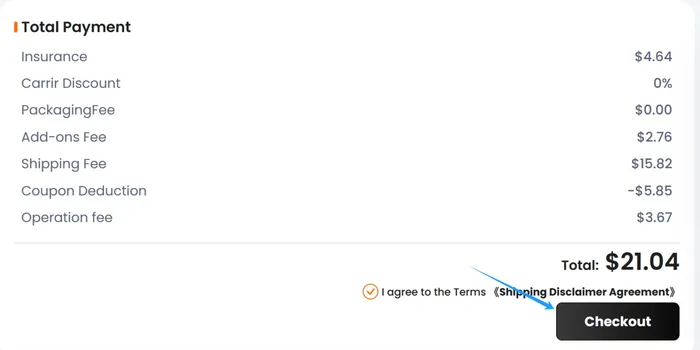
The example screen also shows an “Operation fee” line. The help articles we read do not explain it, so we will not guess what it covers; ask customer service if it appears on your parcel.
Money back goes to the balance before the bank
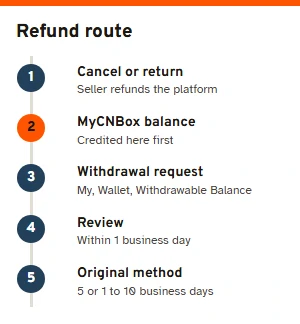
Money from a cancellation or a return goes to your MyCNBox account balance, not straight back to the card (help article 125). Money leaves the balance only by withdrawal: [My], then [Wallet], then [Withdrawable Balance], pick the payment record and submit an amount. Withdrawals are reviewed within one business day and go back by the original method.
Two official timings exist for the last leg: usually five business days in article 64, and one to ten business days in article 66. On fees, article 61 says the bank charges a $1 processing fee and article 65 says MyCNBox itself charges nothing but the bank or processor typically takes $1. As of 10 November 2026, article 64 also opens by asking you to contact customer service for a withdrawal.